

We are excited to introduce you to Meridian, the new cPanel interface, designed to make managing your website and hosting account easier, smoother, and more enjoyable.
If you regularly use cPanel to manage your website, email accounts, domains, databases, and other hosting features, you will love the fresh experience Meridian brings.
With its modern design, improved navigation, and better organization of tools, Meridian makes it easier to find what you need and get things done without having to navigate through multiple menus.
In this article, we will walk you through some of the benefits of the new Meridian theme and show you how to switch to it in just a few simple steps.
What Is the cPanel Meridian Theme?
Meridian is a newly redesigned cPanel interface that provides a more modern, organized, and user-friendly experience.
Unlike the traditional cPanel interface, which groups tools into categories, Meridian organizes features around common tasks and what you want to accomplish.
Whether you want to manage your website, create an email account, upload files, manage databases, or improve your website's security, Meridian provides a more straightforward way to access these features.
Why Should You Switch to Meridian?
Here are some reasons you should give the new Meridian interface a try:
1. A Modern and Beautiful User Interface
One of the first things you will notice about Meridian is its fresh and modern appearance. Its clean layout makes the interface more attractive, organized, and comfortable to use.
2. Easier Navigation
Finding the tools you need is now more straightforward. Meridian groups related features into dedicated sections, making it easier to navigate your hosting account without searching through long lists of options.
3. Everything Organized in One Place
Meridian introduces six main sections (hubs) to help you manage different aspects of your hosting account:
Websites: Manage your domains, websites, SSL certificates, DNS, and backups.
Email: Access and manage your email-related features.
Files: Manage your website files and folders.
Databases: Access and manage your databases.
Security: Find tools for protecting your hosting account and website.
Performance: Monitor your website and hosting resource usage.
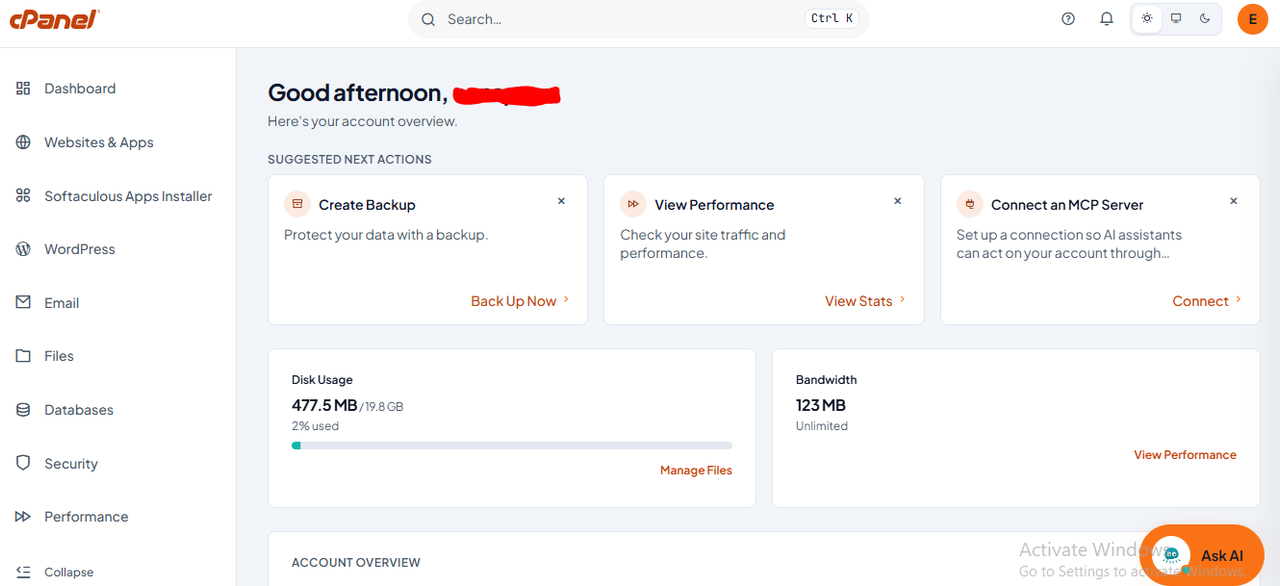
4. A Smarter Dashboard
The new dashboard gives you a better overview of your hosting account. It can highlight important items that need your attention, suggest useful next steps, and display information about your account and resource usage.
This makes it easier to stay informed and identify tasks that may require your attention.
5. Find Features Quickly with the Search Tool
Can't remember where a particular feature is located? No problem!
Meridian comes with a convenient search feature called the Command Palette. Simply type the name of the feature you are looking for, and Meridian will help you locate it.
You can access it by clicking the Search bar or pressing Ctrl + K on your Windows computer.
6. Light and Dark Display Options
You can also adjust the appearance of your interface to suit your preference. Whether you prefer a bright, clean display or a darker appearance, Meridian gives you display options to make your experience more comfortable.
How to Switch to the New Meridian Theme
Ready to experience the new interface? Follow these simple steps:
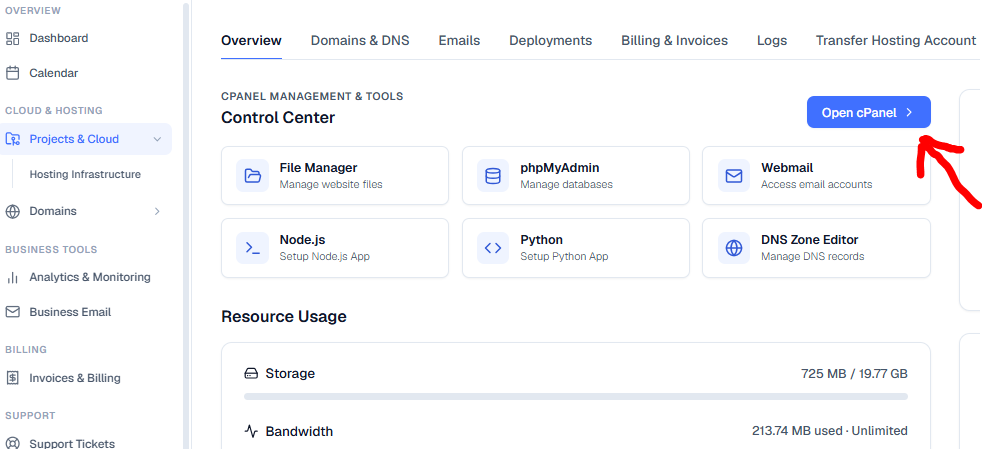
Step 1: Log in to your WWS dashboard
Log in to WWS dashboard and access your hosting service as you normally would.
Step 2: Select 'Open cPanel'
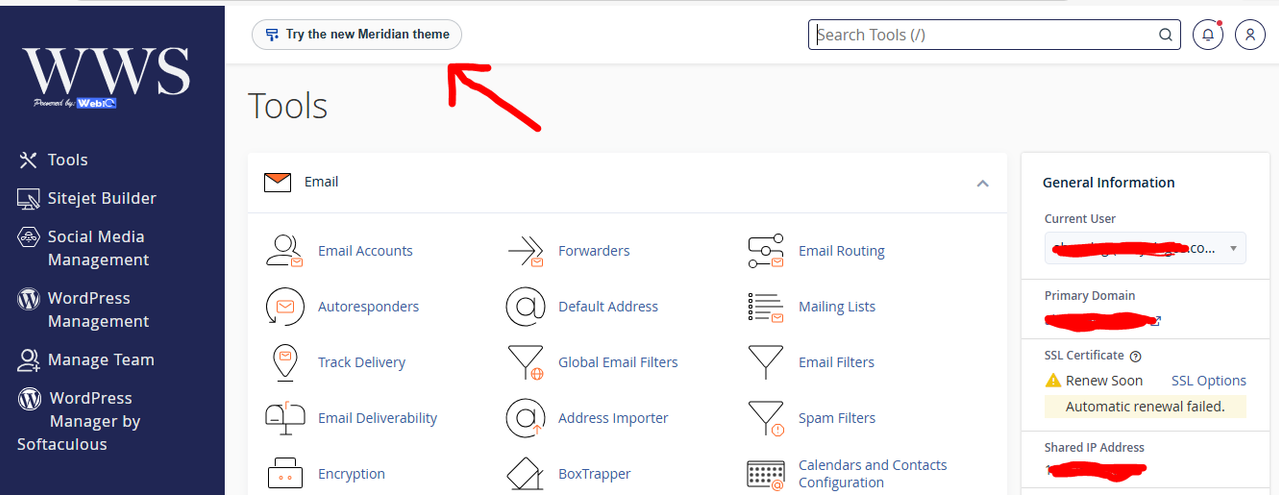
Once you are logged in, locate the top left of the cPanel and select 'try the new meridian theme'
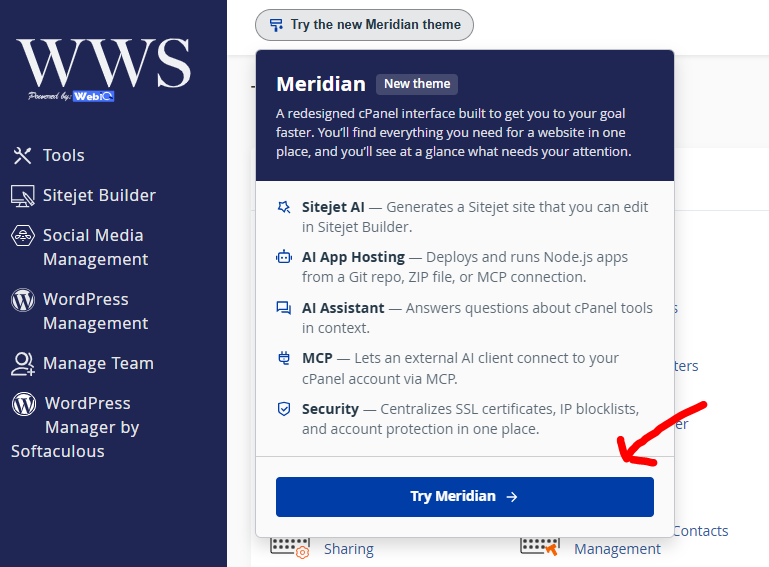
Step 3: Scroll down and select 'try meridian'
Your cPanel interface will switch to the new Meridian theme.
Step 4: Start exploring!
That's it! You can now enjoy the new interface and explore the different sections to manage your hosting account more easily.
Can I Switch Back to the Old cPanel Interface?
Yes, eligible accounts can switch back to the traditional Jupiter interface.
If the option is available on your account, simply click Classic cPanel Theme in the Meridian header. Alternatively, return to Account Preferences and select Jupiter under the Theme section.
Please note that theme switching depends on your hosting provider's settings and how your cPanel account was originally configured. Accounts created on Meridian may not have the option to switch back to Jupiter themselves.
Frequently Asked Questions
1. Will switching to Meridian affect my website?
No. Switching your cPanel interface theme does not affect your website, website files, databases, email accounts, or existing hosting configurations.
2. Will I lose any of my files or website data?
No. Your files, databases, emails, and other hosting data remain intact when you switch themes.
3. Is Meridian difficult to use?
Not at all! Meridian is designed to make navigation easier, with clearly organized sections and a convenient search feature to help you find what you need.
4. Do I have to switch to Meridian?
No. Meridian is an alternative interface to the traditional Jupiter theme. You can continue using your existing interface if you prefer, subject to the options enabled for your account.
5. What if I cannot find the Meridian option?
If you cannot see Meridian under your account, it may not yet be enabled for your hosting account. Kindly contact our support team for assistance.
Need Help?
We are always happy to help! If you experience any difficulty switching to the new Meridian theme or navigating your cPanel account, please reach out to our support team. We will be glad to assist you.
Contact Us Today